
Microsoft Multi-Factor Authentication to replace Duo Mobile
On May 29, 2026, Purdue will adopt Microsoft Multi-Factor Authentication (MFA) for all university accounts systemwide. This will simplify the MFA process and eliminate the need for Duo Mobile for Purdue locations in West Lafayette and Indianapolis as well as Purdue Northwest and Purdue Fort Wayne. (Note: Some Purdue Global applications such as OneLogin, Purdue Global email, etc. will continue using Duo Mobile to authenticate.)
All users will be required to enroll with Microsoft MFA to access Purdue applications including email and applications protected by Purdue Single-Sign-On (SSO) such as SuccessFactors, Brightspace, myPurdue, etc. No action is required for users already enrolled in Microsoft MFA with their username@purdue.edu account.
FAQs: https://service.purdue.edu/TDClient/32/Purdue/KB/?CategoryID=29
What changes for me?
- Users will notice a change in the SSO login screen. (Example below)
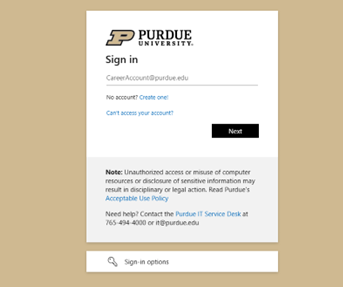
- All users will need to authenticate Purdue services with their “username@purdue.edu” and password.
- Users will be required to use Microsoft MFA to complete authentication. This will affect applications utilizing Purdue SSO as well as the VPN. Supported methods for Microsoft MFA include the Microsoft Authenticator application (default and preferred method), SMS codes, phone calls and physical hardware tokens. Purdue IT recommends users set up at least two MFA methods (ex: Microsoft Authenticator app and SMS Codes). To add an additional authentication method, see: How to change Microsoft MFA authentication methods.
- Most users should already be enrolled in Microsoft MFA to access Microsoft applications such as Outlook, Teams, OneDrive, and Office 365.
What are the benefits of this change?
- Cost savings: Eliminating Duo reduces licensing and support costs.
- Simplified user experience: Users will only need to manage a single MFA method and device.
- Consistent security posture: Aligning with Microsoft MFA ensures a unified and modern authentication platform across all Purdue systems.
Using hardware tokens with Microsoft MFA
The university-provided hardware tokens used with Duo are not compatible with Microsoft MFA. Additional information, including how to purchase new tokens, will be emailed to current hardware token users in the coming weeks. Please note that these tokens will need to be purchased by you personally or through your Business Office.
Actions required before May 2026:
- Confirm enrollment in Microsoft MFA before the end of spring semester.
- If necessary, purchase Microsoft MFA-compatible hardware token.